▲ Case 03 · Automation of a regulated process
Eleven documents, two utilities, one command
A solar system can be fully installed on the roof and still generate nothing, because between the customer and the energy there is a dossier the utility has not approved yet. One wrong attachment sends the process back and costs weeks.
- Period
- April to September 2026
- My role
- sole author, I answer for the result
- Language
- Python
- Status
- used in operations from April to September 2026
How it is built
- Input
- A web form served on the machine itself, which saves one JSON file per customer. The JSON is validated with
jsonschemabefore any stage runs. - Orchestration
- An orchestrator resolves the utility once and fires eleven stages in sequence, each one in an isolated module with its own entry function.
- Official spreadsheet
- LibreOffice in headless mode opens the utility's file, fills in the cells and forces the recalculation.
lxmlworks on the internal XML of the.xlsxwhen the filling has to be surgical. - Technical drawing
reportlabgenerates the drawing sheets from the project data: module layout, single-line diagram, string box and alternating current panel.- Geolocation
utmconverts between geographic coordinates and UTM, which is the system the location map has to come out in.- External sources
- PVGIS, the European irradiation database, for the estimated production at the site. INMETRO for the certificate of each inverter and module.
pypdfto read the access opinions (the utility's grid-access assessment) that arrive as PDF. - Assisted extraction
- The Anthropic SDK to pull structured data out of unstructured documents, in an optional stage that runs before the form.
- Safeguard
- Four frozen baselines that compare the finished artifact, not the code that generated it.
The decisions, and what I ruled out in each one
The system picks the documents, not the person
Each utility asks for a different set of documents to connect a solar plant: CEMIG asks for one, Equatorial Goiás asks for another. The operator only fills in the customer's data. The system identifies the utility and builds on its own the set that utility requires.
What I ruled out: letting the person tick, on a list of eleven documents, which ones go into the request. To get it right, they would have to remember each utility's rule in the middle of repetitive work, which is exactly when people forget.
A wrong attachment is refused, not flagged later
When the robot detects that an attachment came out wrong, it removes the reference and leaves the item as pending, instead of delivering the file.
Why: a missing attachment shows up on the pending list and someone adds it before sending. A wrong attachment reaches the utility, and comes back weeks later. The two cost different amounts.
The robot also refuses to tick a connection option that the utility's own access opinion declares unfeasible, and refuses to generate the term without the original project.
Access opinion data is read from the PDF, never typed
The numbers from the reverse power flow study come in read from the PDF of the access opinion issued by the utility.
What I ruled out: a field in the form for the operator to copy the value. Retyping a number from an official document is the cheapest source of error there is, and the error only shows up when the process comes back.
When the second utility was added, the first one came out identical byte for byte
Parameterizing a generator that already works is where you break what was right. The safeguard was to freeze the result: four baselines compare the finished artifact, not the code.
The technical description is checked with the text in order. The utility's attachment is checked member by member inside the compressed file, because the checksum of the .xlsx changes on its own: the format records the date and time of compression.
What I ruled out: relying on unit tests of the changed functions. They pass while the delivered document shifts.
Updating a baseline is manual on purpose: if it were automatic, it would record the defect as if it were the new correct result.
A document declares which code is live
The project has 121 scripts. More than once I edited a file, ran the process and the output came out the same, because the file was not on the execution path.
The fix was to write a document that lists, stage by stage, which file is called and by which function. Its first line says to read it before touching anything.
Why: losing time like that once is distraction. Twice is a sign that the project was not telling the truth about itself.
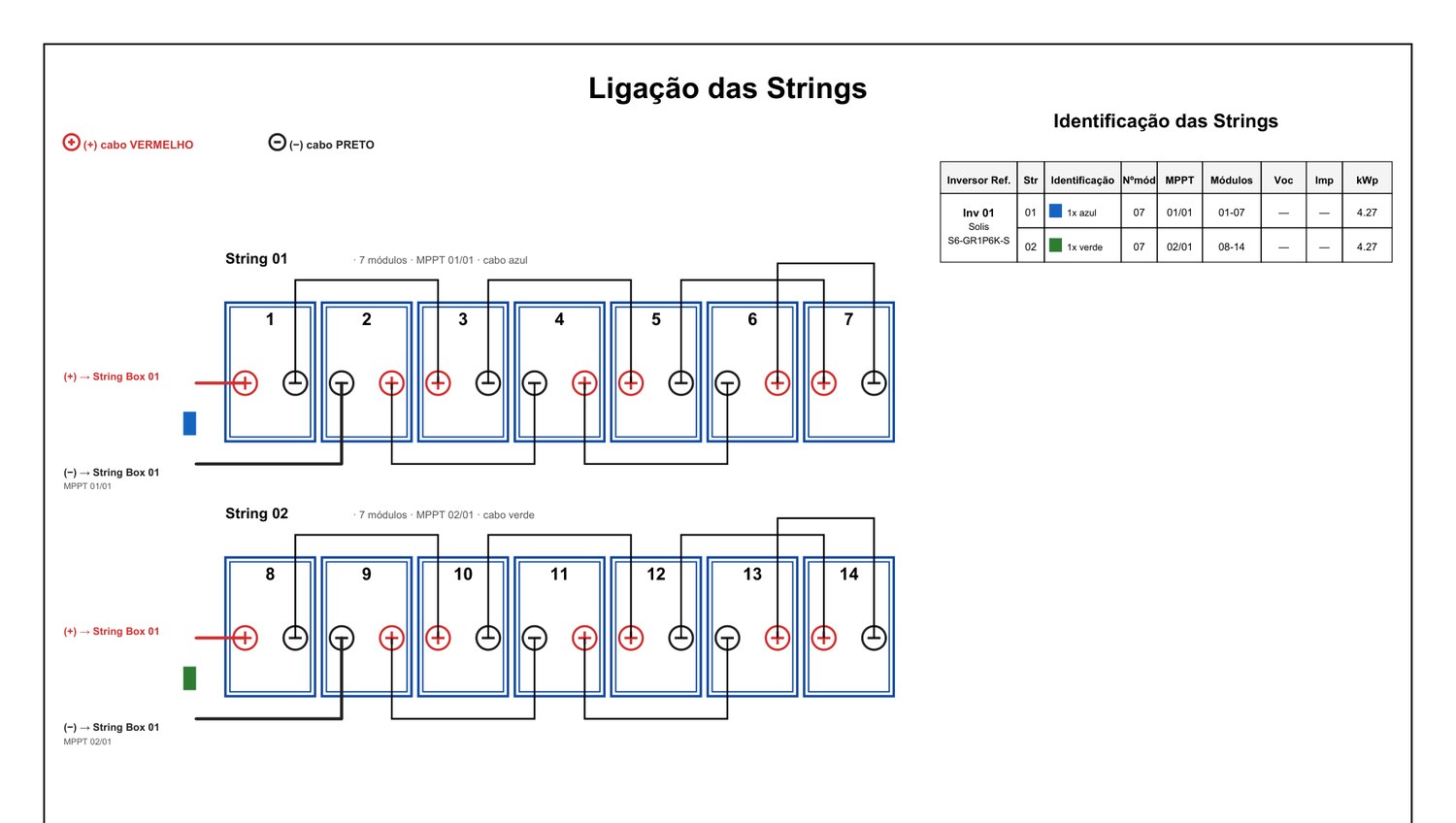
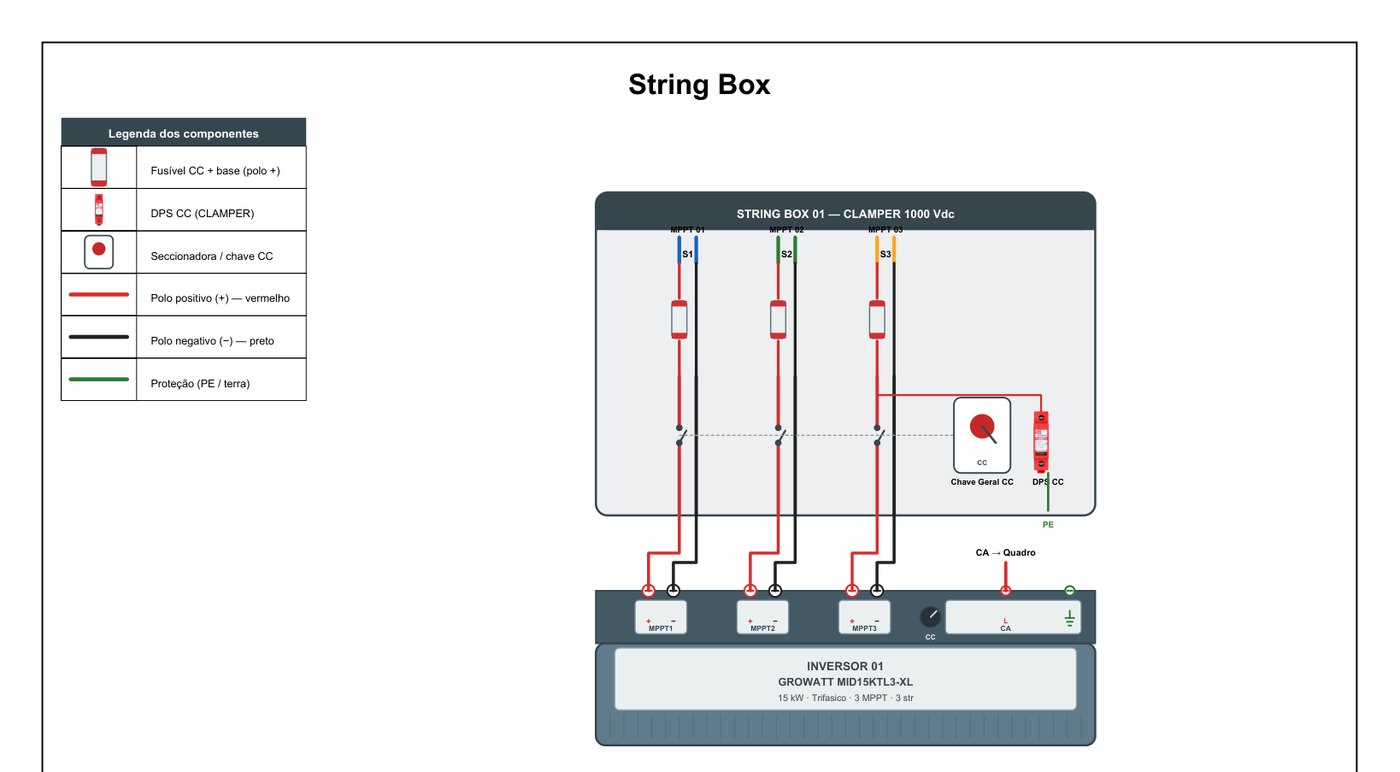
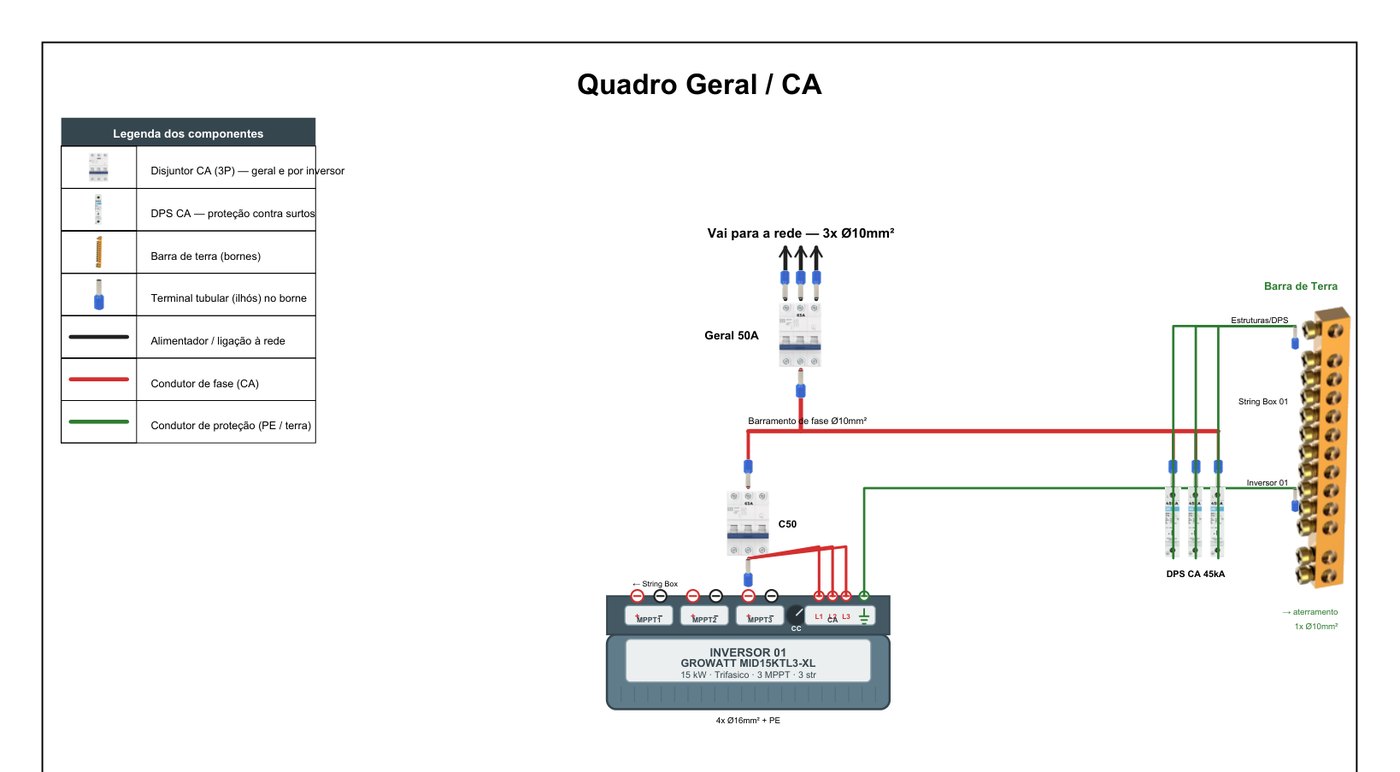
The drawings come from that project's data: number of modules per roof face, number of inverter inputs, sized protection. Change the project, and the drawing changes.
Counted in the repository on September 22, 2026, covering the period from April to September 2026.